
When you visit a website, you likely want to ensure that your personal information is safe. One of the main indicators of a secure connection is a website’s security certificate. Understanding how to verify website security certificates is crucial in protecting yourself online.
Website security certificates, more commonly known as SSL (Secure Socket Layer) certificates, are essential for establishing a secure connection between your browser and the website you’re visiting. Here’s how you can verify these certificates.
Step-by-Step Guide to Verify Website Security Certificates
Follow these simple steps to check if a website’s security certificate is legitimate:
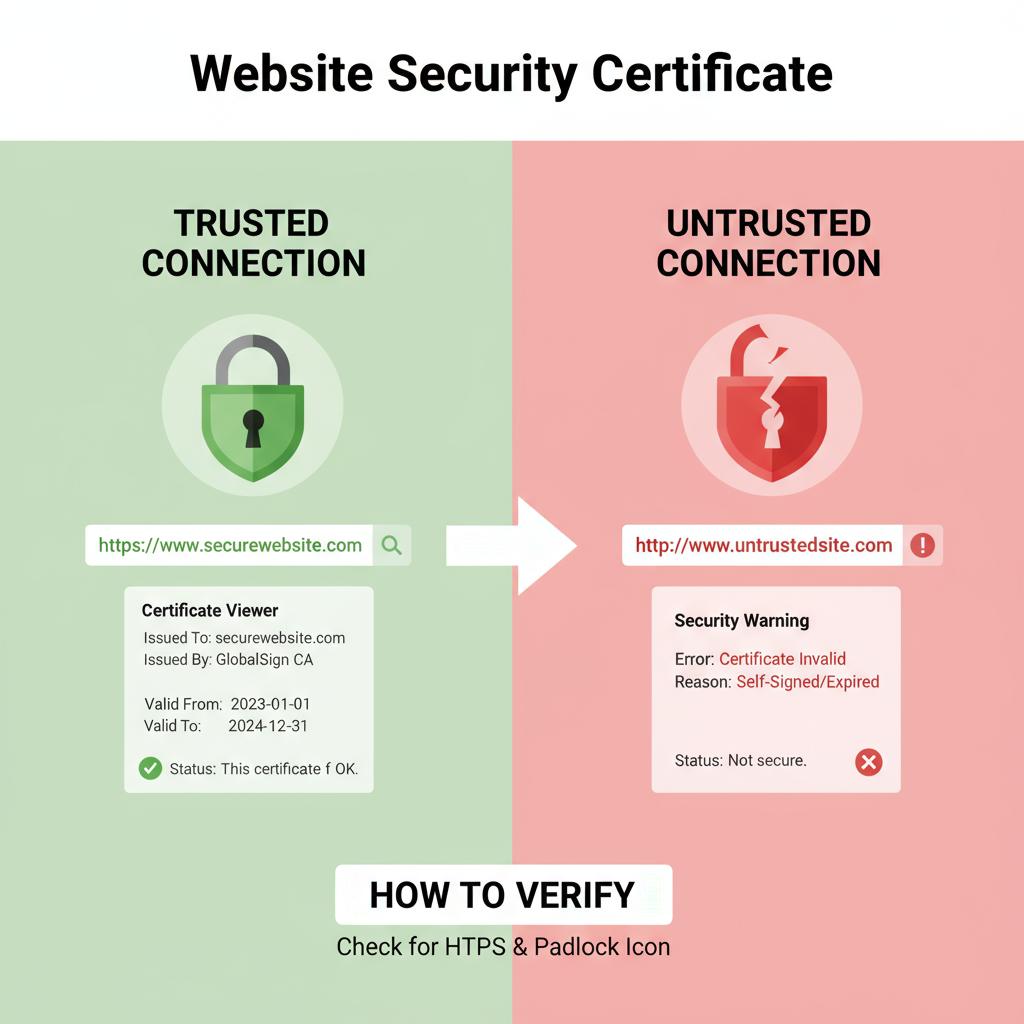
- Look for HTTPS: When you access a website, check the URL. A secure website uses “https://” at the beginning. The “s” stands for secure. If you see “http://” without the “s,” the site may not be secure. Learn more about why HTTPS is more secure.
- Check the padlock icon: Next to the URL bar, look for a padlock symbol. This icon indicates that the website has a valid SSL certificate. Clicking on this padlock can provide you with further details about the security of the site.
- View certificate details: By clicking on the padlock icon, a small window will pop up. Here you can usually see basic information about the website’s security certificate. For in-depth details, click on ‘Certificate’ or ‘More Information.’
- Examine the issuer: A verified security certificate is issued by a trusted Certificate Authority (CA). Check who issued the certificate and ensure it’s a well-known CA, such as DigiCert, Let’s Encrypt, or Comodo.
- Check the expiration date: Every SSL certificate has a validity period. Make sure the certificate is still valid and has not expired. If it is expired, the website may not be secure.
- Verify the domain: The certificate must match the domain you are trying to access. Ensure that the certificate is issued for the exact web address you are visiting.
Importance of Reliable Security Certificates
Understanding how to verify website security certificates is not solely about checking if a website is safe; it’s imperative for your online safety. Here are a few reasons why it matters:
- Data Protection: A secure SSL connection protects sensitive information, such as usernames, passwords, and financial data, from being intercepted by hackers. This encryption is a cornerstone of cybersecurity.
- Building Trust: When a website has a valid security certificate, it fosters trust among its users. Visitors are more likely to provide their information when they know their data is secure.
- Improved SEO: Google takes website security into account when ranking sites. A secured website can enhance your SEO efforts, allowing you to reach a wider audience.
- Authentication: SSL certificates verify the legitimacy of the website. Users can be confident they are interacting with a genuine site and not a fraudulent one.
Common Mistakes to Avoid
While verifying website security certificates is straightforward, common errors can undermine your efforts. Avoid these mistakes:
- Ignoring browser warnings: If your browser warns you that a website is not secure, heed that warning. Do not proceed unless you are sure about the safety of the site.
- Assuming all HTTPS sites are safe: Not every website with HTTPS is necessarily secure. Always verify the details of the certificate.
- Forgetting to update security knowledge: Cyber threats evolve. Stay informed about the latest security practices and be vigilant about new threats. Understanding different types of cyber threats is a good first step.
Being proactive about your online security is essential in today’s digital landscape. Regularly verifying website security certificates can significantly reduce risks and ensure your online interactions are secure. Remember, when in doubt, it’s best to err on the side of caution. Enabling your online safety starts with being aware and verifying.
The Importance of SSL Certificates for Online Safety
In today’s digital world, ensuring online safety is a top priority for both businesses and users. One primary component of this safety is the SSL certificate. SSL, which stands for Secure Sockets Layer, plays a crucial role in establishing a secure communication channel between a user’s browser and a website. Here’s a deeper look at why SSL certificates are essential for safeguarding online activities.
First and foremost, SSL certificates protect sensitive data. Whenever you enter personal information, such as credit card details or your address, you want that data to be transmitted safely. SSL encryption ensures that even if the information is intercepted, it remains unreadable. This protection is paramount for e-commerce websites, online banking, and any platform asking for personal data.
Secondly, using an SSL certificate enhances your website’s credibility. When users see “HTTPS” in the web address, it signals that the site is secure. This small change can create trust. People are more likely to interact with a website they know is protected. Browsers like Chrome and Firefox actively warn users when they’re entering a non-secure site. These warnings can deter potential customers, making SSL a vital component of your website’s first impression.
Moreover, employing SSL certificates positively impacts your search engine rankings. Google has made it clear that it favors secure websites. Websites with SSL are more likely to rank higher in search results compared to their non-secure counterparts. This benefit can lead to increased visibility, bringing more potential customers to your site.
Let’s break down the primary benefits of using an SSL certificate:
- Data Security: Protects user information from hackers and eavesdroppers.
- Customer Trust: Establishes credibility, leading to increased user engagement.
- Search Engine Ranking: Websites with SSL are favored in search results.
- Protection Against Phishing: Notifies users about secure communication, which helps reduce fraud. Learn more about what a phishing attack is.
It’s also important to know that there are various types of SSL certificates available. The choice largely depends on your needs:
- Domain Validated (DV): Basic level of encryption, ideal for small websites.
- Organization Validated (OV): Provides a higher level of trust for businesses by confirming the organization’s identity.
- Extended Validation (EV): The highest standard of SSL, displaying the name of the business prominently in the address bar, ideal for e-commerce sites.
Also, you’ll want to consider how to verify that your SSL certificate is functioning correctly. Here are some steps you can take to check:
- Open your web browser and navigate to your website.
- Look for a padlock symbol in the address bar. Click on it to view the certificate details.
- Ensure that the certificate is valid and issued to your website.
- Check the expiration date; SSL certificates need renewal periodically.
Another critical aspect of SSL certificates is their ability to bolster overall internet safety. By adopting SSL, your website becomes part of a larger movement toward a secure web. This collective effort helps protect data and build a safer online environment for everyone.
As we navigate through various online platforms daily, the role of SSL certificates cannot be overstated. Whether you’re running an e-commerce business or a personal blog, ensuring you have an SSL certificate is essential. It not only protects your users but also enhances your website’s reliability and visibility. In a world where online threats are increasingly sophisticated, adopting SSL is a step toward a safer internet experience for both you and your users.
Common Signs of a Valid Security Certificate
When browsing the internet, ensuring your safety and privacy is essential. One critical aspect of online security is the website’s security certificate. A valid security certificate protects your data and verifies the site’s authenticity. Here are some common signs that indicate a website has a valid security certificate.
Visible HTTPS in the URL
One of the most straightforward indicators of a secure website is the presence of ‘HTTPS’ at the beginning of the web address. The ‘S’ stands for secure, indicating that the site uses an SSL (Secure Socket Layer) certificate to encrypt information transferred between your browser and the website. In contrast, sites that only show ‘HTTP’ lack this layer of security, making them less safe.
Padlock Icon
Alongside the HTTPS prefix, you will usually see a padlock icon in the address bar. This symbol signals that the website’s connection is secure. Clicking on the padlock will provide additional details about the certificate, including who issued it and its validity. If the padlock is crossed out or missing, it’s best to be cautious before entering any personal information.
Certificate Details
To verify a website’s security certificate further, you can delve into its details. Here’s how you can do this:
- Click on the padlock icon in your browser’s address bar.
- Select “Certificate” or “View Certificate” from the dropdown menu.
- Check the certificate’s expiration date to ensure it is still valid.
- Look for the name of the organization that owns the domain and ensure it matches the website.
- Identify the Certificate Authority (CA) that issued the certificate; reputable CAs indicate a stronger security level.
Website Ownership Verification
Legitimate security certificates include details about who owns the site. Reputable websites will display the name of the organization clearly. If the name is absent or appears suspicious, it’s a warning sign. You can also use online tools to further investigate the domain ownership and confirm its legitimacy.
Compatibility with Major Browsers
A valid security certificate will be recognized by major web browsers like Chrome, Firefox, and Safari. If you encounter a message stating that a site’s certificate is not trusted or if it blocks access, it is likely that the certificate is outdated or invalid. Stick to sites that are verified and accessible without warnings from your browser.
Regular Updates and Renewals
Another marker of a secure site is the regular renewal of its security certificate. SSL certificates come with expiration dates. Sites that keep their certificates updated show a commitment to security and care for user data. If you notice that a site hasn’t updated its certificate in a long time, it may be best to avoid it.
Extended Validation Certificates
Some websites use Extended Validation (EV) certificates, which provide a higher level of verification. These certificates often display the organization’s name in the browser’s address bar, offering additional assurance of authenticity. If you see a green bar or the organization’s name highlighted, it confirms that the website has undergone extensive verification processes.
User Reviews and Reputation
Consider the reputation of the website. Look for reviews and feedback from other users regarding their experiences. Well-known sites are less likely to compromise your security. Always research, especially when dealing with unfamiliar sites, as customer reviews can reveal any security issues that others have faced.
Verifying a website’s security certificate is critical to protecting your online presence. By paying attention to indicators like HTTPS, the padlock icon, and certificate details, you can make safer browsing choices. Additionally, consider the site’s ownership verification, compatibility with browsers, and user reviews to better assess its trustworthiness. Ultimately, your safety online should always come first.
Steps to Take If a Website’s Certificate is Invalid
When you visit a website and see a warning indicating that its security certificate is invalid, it’s crucial to take the situation seriously. A secure connection ensures that your personal information remains safe from hackers and malicious actors. If you encounter an invalid certificate, here are the steps you should take:
Assess the Warning Message
The first step is to read the warning message carefully. Browsers such as Chrome, Firefox, and Safari often display specific details about the certificate problem. Pay attention to whether the certificate has expired, if it is untrusted, or if there are other issues. Understanding the specific error will help you decide how to proceed.
Check the Website URL
Before taking any further action, double-check the website URL. Ensure that you typed it correctly. Sometimes, a simple typo can direct you to a malicious website that mimics a legitimate one. Use only secure URLs that start with https://. The “s” stands for secure, indicating that the site has a valid SSL certificate.
Look for Contact Information
If you are uncertain about the website’s security, look for contact information. A reputable site provides clear contact details. Reach out to the website’s support team to inquire about the security certificate. They should be able to clarify why the certificate is invalid and provide a timeline for resolving the issue.
Try Accessing the Website Using Another Browser
Sometimes, issues with a website’s certificate can be isolated to a specific browser. Try accessing the site from another browser or device. If the certificate shows up as valid on another platform, the issue may be with your original browser or its settings.
Check Certificate Details
If you’re tech-savvy, you can manually check the certificate details for the website. Here’s how:
- Click on the padlock icon next to the website URL in the address bar.
- Select “Certificate (Valid)” or a similar option.
- Review the certificate information such as the issuer, expiration date, and the domain name associated with the certificate.
This information will help you understand the problem and verify if it’s a legitimate issue with the site.
Don’t Enter Personal Information
If a website’s certificate is invalid, do not enter any personal information, such as passwords, credit card numbers, or any sensitive data. Entering information on a site with an invalid certificate can put you at risk for identity theft or fraud. It’s better to be safe than sorry.
Consider Reporting the Website
If you believe that the website poses a security risk, consider reporting it to your browser or a security authority. Major browsers have features that allow users to submit fraudulent sites. This not only protects you but also helps others from falling victim to potential scams.
Use Security Tools
Utilize online tools that can help analyze website security. Services like SSL Labs offer free checks to assess a website’s SSL certificate and other security features. These tools can provide a deeper insight into the certificate’s health and any issues it may have.
Look for Alternatives
If you cannot resolve the certificate issue or if the website appears suspicious, it may be wise to look for alternative websites. Always prioritize your online safety. Many reputable sites offer similar products, services, or information.
Keep Software Updated
Ensure that your web browser and computer operating system are updated. Developers frequently release updates that patch security holes. Using the latest version of software enhances your security while browsing.
Clear Browser Cache and Cookies
Sometimes, corrupted cache or cookies can affect how a website loads. Clear your browser’s cache and cookies to see if that resolves the warning message. After clearing the cache, revisit the website to check the certificate status.
Taking swift action when facing an invalid website security certificate is essential. Following these steps can help protect you from potential risks, ensuring a safer browsing experience online.
Tips for Choosing Websites with Reliable Security Measures
When browsing the internet, ensuring that a website is secure is essential for your safety. Here are some valuable tips to help you choose websites with reliable security measures. With these tips, you can browse with confidence and protect your personal information.
Check for HTTPS in the URL
The first step to ensure a website’s security is to look at the URL. Websites that use HTTPS (Hypertext Transfer Protocol Secure) have an added layer of security compared to those that use HTTP. The “S” signifies that the connection is encrypted, making it harder for hackers to intercept data. When you see a padlock icon in the address bar, it indicates that the site is using HTTPS.
Examine the Security Certificate
Every secure website has a security certificate issued by a trusted Certificate Authority (CA). You can verify this certificate by clicking on the padlock icon next to the URL. A pop-up will display information about the certificate, including the issuing authority and the expiration date. Make sure that:
- The certificate is issued by a reputable authority.
- The certificate is still valid and has not expired.
- The website’s domain name matches the certificate.
Look for Privacy Policies
Reliable websites should have a clear privacy policy outlining how they handle your personal information. A good privacy policy demonstrates transparency and assures users that their data will be protected. Before entering any sensitive data, take a moment to read it and ensure it aligns with your expectations.
Search for Reviews and Testimonials
Before engaging with any website, do a quick search for reviews. User feedback can provide valuable insights into experiences with the website’s reliability and security. Look for feedback on reputable forums and review sites to get a broader perspective. If a significant number of users have reported security issues, it might be best to avoid that site.
Use Two-Factor Authentication
When creating an account on any website, check if they offer two-factor authentication (2FA). This extra layer of security provides additional protection for your account. Even if someone hacks your password, they will still need a second method of verification—like a code sent to your phone—to access your account.
Analyze the Website’s Design and Professionalism
While this may not be a foolproof method, a well-designed and professionally maintained website often indicates reliability. Check for:
- Spelling and grammatical errors.
- The overall aesthetics—avoid sites that look outdated.
- Contact information—reliable sites usually provide legitimate ways to get in touch.
Pay Attention to Payment Security
If you are shopping online, ensure that the payment process is secure. Look for signs of security, such as the “Verified by Visa” or “MasterCard SecureCode” logos. These measures indicate that the website uses additional protocols to protect your financial information during transactions.
Keep Your Browser Updated
An updated web browser can enhance your security. Most modern browsers provide security features that warn you about dangerous sites or outdated security certificates. Regular updates ensure that you have the latest security features and protections against new threats.
Be Wary of Pop-ups and Adverts
Excessive pop-ups and intrusive advertisements can be red flags for security risks. These elements might be used to track your online behavior or distribute malware. If a website bombards you with ads or pop-up windows, consider looking for an alternative that adheres to better practices.
By considering these tips, you can better assess the security of the websites you visit. Being proactive in checking for these features allows you to enjoy a safer browsing experience, protecting your personal and financial information effectively.
Conclusion
Verifying a website’s security certificate is essential for ensuring your online safety. With the rise of cyber threats, understanding how to recognize valid SSL certificates can greatly protect your personal information and data. By knowing the importance of these certificates, you empower yourself to make informed decisions while browsing the internet.
Familiarizing yourself with the common signs of a valid security certificate—such as the padlock icon in the browser address bar, the HTTPS prefix, and the certificate’s expiration date—enables you to identify secure websites easily. If you encounter an invalid certificate, it’s crucial to take appropriate steps, such as exiting the site, reporting the issue, or seeking alternatives. This proactive approach is vital in safeguarding your sensitive information against potential threats.
Furthermore, choosing websites with reliable security measures is key to a safe online experience. Look for well-known brands or trusted platforms that prioritize user safety. Researching user reviews and checking for security practices can provide additional peace of mind.
By staying informed and vigilant, you can navigate the internet more securely. Remember, your online safety starts with understanding the importance of SSL certificates and how to verify them. Keep these tips in mind whenever you browse, and you’ll increase your chances of having a safe and secure online experience.